Renko Maintenance Log - Apr 18-19th 2026
Introduction
It’s been a long while since I properly maintained my NAS. To remind our audience what I have:
1 | |
I still remember that it was back in late 2024 that I purchased all the parts for this NAS. I got 4 4T Seagate Skyhawks for roughly ¥CNY 400 each (roughly USD 57 each). It was quite a great deal back then, given that the price of HDDs has now gone up to around USD 30/Terabyte. I still remember last summer in Oregon when I was debating whether I should grab the USD 15/T deal from Best Buy (in hindsight I really should have, given OR doesn’t have sales tax). Now it’s 85% full and I’ll have to seriously consider buying a bunch more.
It was funny when thinking about the motherboard supermicro X11SSH-F. All of its video outputs are essentially broken – HDMI, VGA, etc. I don’t know how to use serial ports. It was quite a bargain that I bought from 咸鱼 (basically the Chinese fb marketplace) for ¥200, whereas the listed price on Amazon was like:
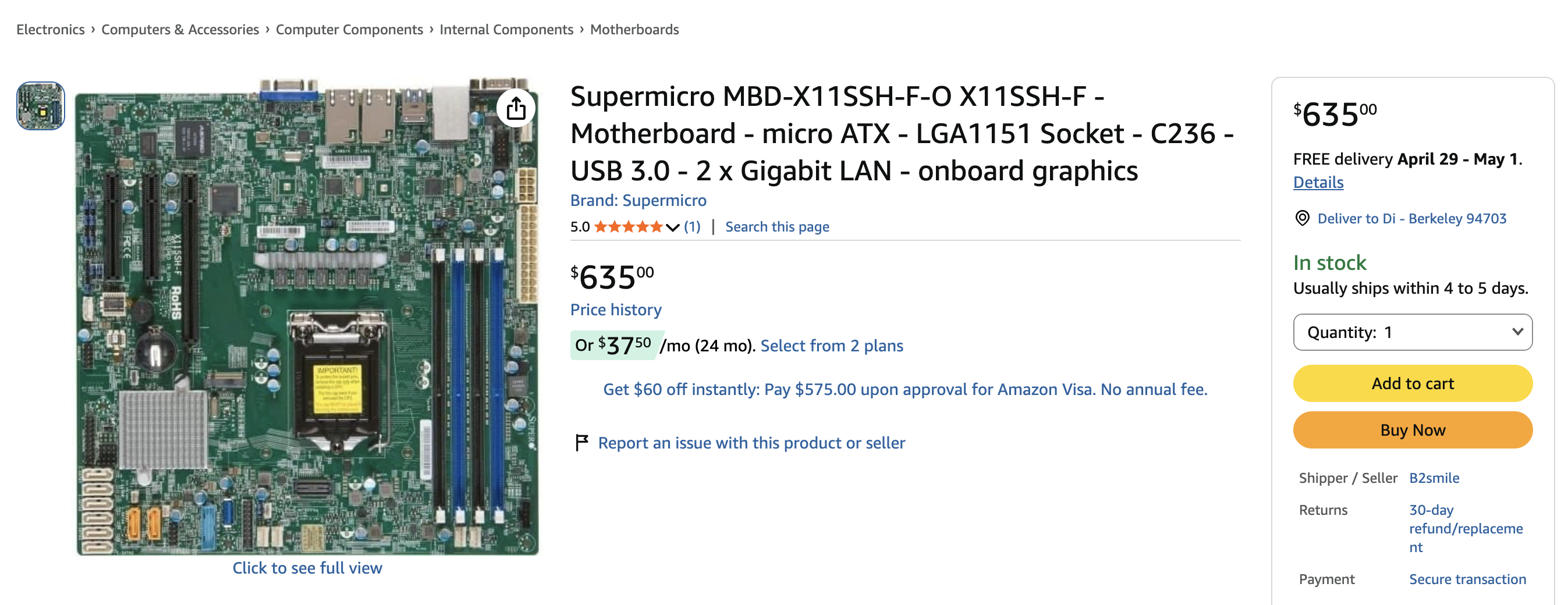
It was funny because the previous owner had no idea what the IPMI IP address was – it was hard coded in BIOS; however, without video output, I wasn’t able to reset the IP address, nor could I install a new OS. I spent a night writing a script on my openwrt router to try changing the subnet and pinging potential addresses, assuming it began with 192.168. I didn’t manage to find one until the next day, when the owner messaged me saying that he recalled it was under 192.168.254.xxx, and I realized the IPMI was actually at 192.168.254.1. When I opened up IPMI, I saw the BIOS startup screen as “比特币挖矿系统” (BTC mining system) and I finally understood why it was so damn cheap. That was back when BTC mining was still pretty popular.
Anyways, I installed Fedora 40 back then and never worried about it again. I ran docker containers, my own chatbot, and reverse proxy services, but after last weekend reminded me of the Fedora 44 news, I thought it was time to actually try to upgrade the very broken system, since a lot of the “DevOps” things that I did were very, very ad hoc.
Fedora 40 -> 43, RAM speed optimization
Fedora 40 was EOL like a year ago; therefore, upgrading the system was the first thing I did. It wasn’t too hard to pull the prebuilt image and install it. For safety I did this in 3 steps: 40->41, 41->42, 42->43, each taking about half an hour.
Given I had to reboot the system anyway, I realized that all 4 DDR RAMs were running at 2133 instead of their rated speed of 2400. So I went into the BIOS settings to try to manually set the RAM speed to 2400.
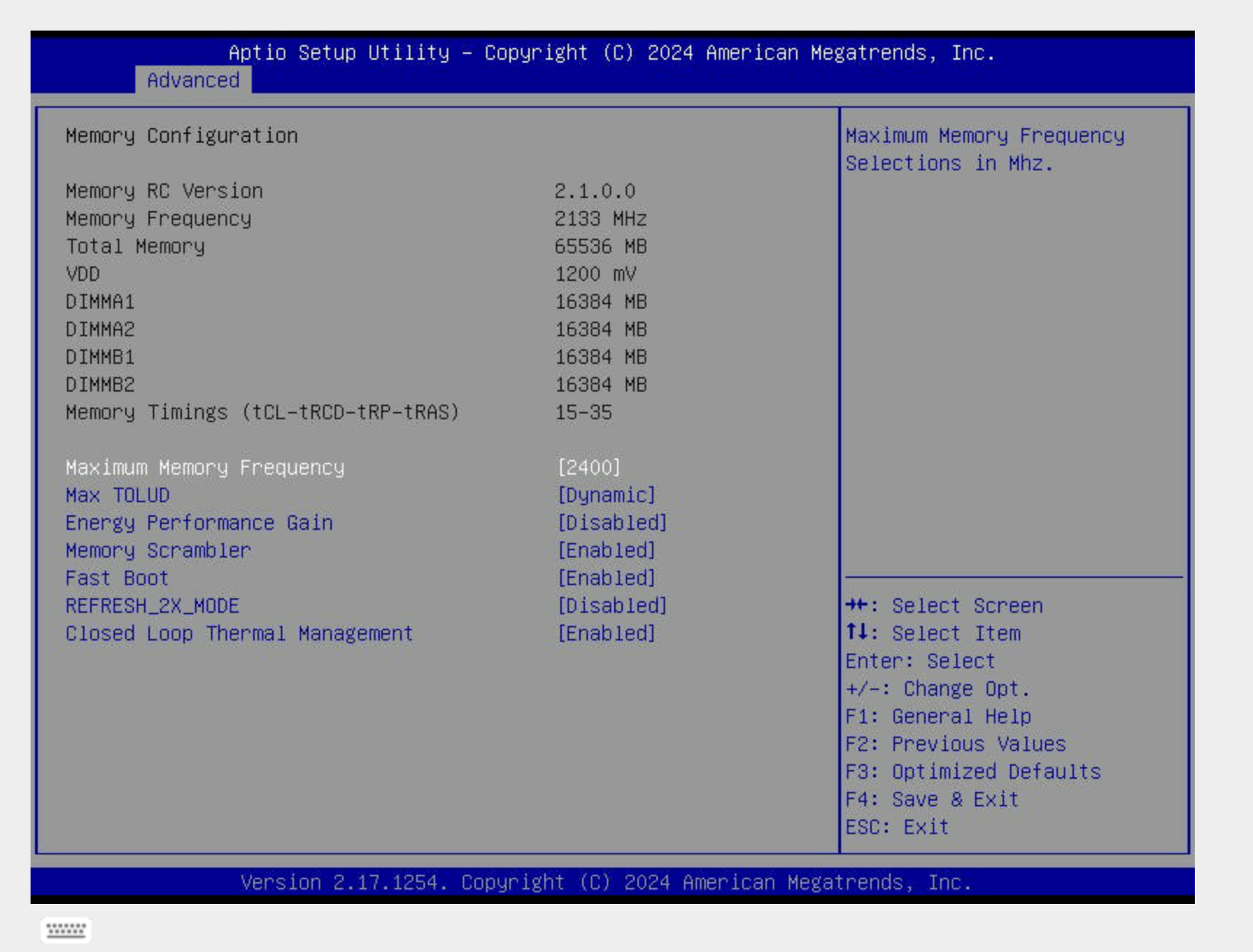
However, I think it’s pretty much a limitation of the motherboard not being able to support XMP; the E3-1280 V5 skylake CPU also blindly ties the memory bandwidth to 2133 (lame!), so setting the maximum frequency was the best thing I could do.
It was funny looking back at how long I spent dealing with IPMI once again. I have a custom nginx configuration where I assign the private domain name ipmi.renko.cedard.top to the IPMI port, but it wasn’t connecting at the very beginning. It took me quite a while to troubleshoot whether this was a problem with some stale nginx setting, but it wasn’t until I realized the IP wasn’t up either that I found the IPMI port wasn’t connected to an RJ45 cable, haha.
Once Fedora 43 booted up on the NAS, I finally caught up with the lifecycle of the system, and the kernel was also updated to 6.19.12.
1 | |
I set up a monthly reboot on Sunday morning at 3am to ensure the system is always up-to-date and running smoothly.
1 | |
Docker Stuff
I have a few services on docker, but they were all running under my own home directory instead of being properly archived. Some of them were also running on really really old images, simply because I was too lazy to pull from dockerhub.
Docker runs as a systemd service under fedora, and any docker service that has the restart flag in docker-compose.yml will be automatically registered and restarted. This is pretty convenient since I don’t really have to create separate systemd daemons for each one of these. Housekeeping: I put all of them under /opt.
I was trying to see if I could have them all automatically update themselves. Claude told me that there is a specific docker image watchtower that does this, only for me to realize that watchtower is no longer being maintained.
A simple script does this:
1 | |
I did realize the postgres image was a corner case, where pulling the latest image broke the split flow. It tried to pull PG18, and broke the PG16 data directory.
Security
I turned off all password logins, only allowing SSH key-based authentication, and disabled unused firewall ports.
ZFS
RAIDZ1
Here comes the big deal. I use raidz1 for all 4 of my drives, but I do realize that if a drive fails, during rebuild I’ll have no additional layer of protection, and rebuilding makes it pretty likely that other drives might fail too, especially if they all come from the same batch (mathematically, two independent Poisson processes can be summed in terms of fail rate. It gets even worse if they are correlated). However, I don’t really have the luxury to do raidz2 right now, so I guess I’ll have to live with it for some time.
Some optimizations
lz4 is better than lzjb in terms of data writes because it’s faster and has a higher compression ratio.atime is not necessary when doing writes. Therefore I made both changes:
1 | |
Larger Record Size for media
I also created a separate dataset for my movies where sequential RW matters. Compared to 128K default chunk size, 1M reduces IO access counts significantly.
1 | |
Auto ZFS snapshot
There is this nice repo from GitHub where we can keep continuous zfs auto snapshots. This is super useful if I ever need to roll back.
This actually did save me because I messed up postgres yesterday and I managed to recover in no time.
That’s it. I will try to write up my learnings + sharings for future sysadmin stuff as separate blogs; this is just one of them. I’ll probably try to update the system to Fedora 44 this upcoming weekend.
If you are using some of my services, I have a dedicated uppage (hopefully not a downpage) here.
BTW if you don’t know about this already, I drew the name “Renko” from the character “Renko Usami”, a physics undergrad studying supernatural encounters.
](https://raw.githubusercontent.com/cedard234/imagerepo/master/math20260420232915.png)
It’s funny that I named my NAS Renko because I named the reverse proxy VPS Hearn, who just so happens to be her bestie :)